
How To Promote Your Music on Instagram
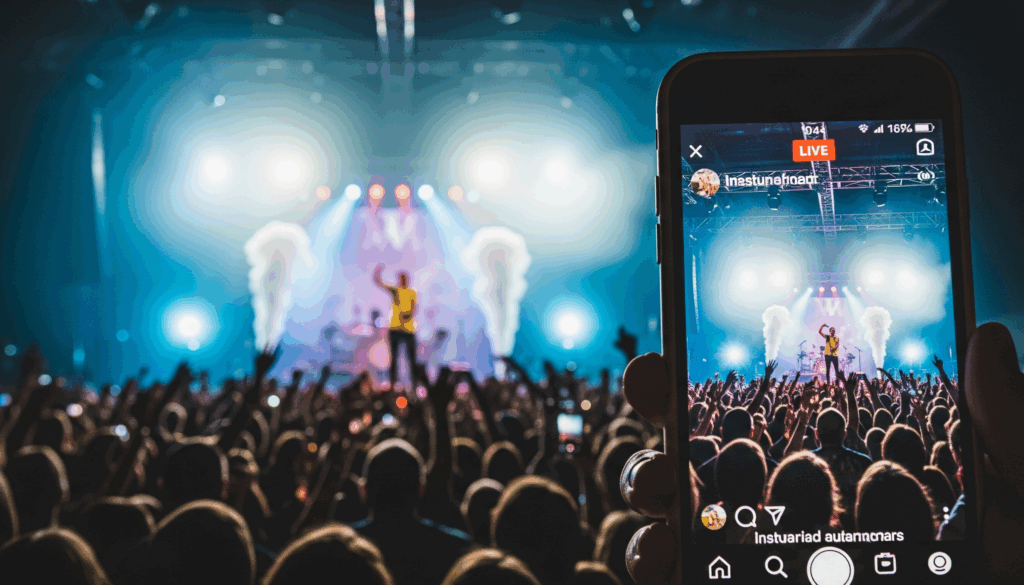
Instagram is your stage — one of the best places to share your music and connect with people who could actually become fans. If you still think of it as just a spot for coffee selfies and cat photos, it’s worth another look: for working musicians, it’s a real distribution channel. Step onto that stage with content that’s built for it, not just noise.
You don’t need a stadium-size following to make Instagram work for your music. You need a consistent presence: posts that share your sound, stories that show your process, and a profile that makes it easy for someone to become a fan. Think of Instagram as your personal venue — you set the mood, share the music, and build the brand around it.
In this article, we’ll cover how to promote your music on Instagram — no fake hype, no growth shortcuts, just what actually works. Maybe you just dropped your first track. Maybe you’ve already got a full band, loyal fans, and a label behind you. Either way, this guide is for you.
Why Use Instagram for Music Promotion?
TikTok might be where trends are born, but Instagram is where a music career grows over time. Your feed works like an album cover, your Stories are the behind-the-scenes, your Reels are the live show, and your DMs are the green room where you talk to fans directly.
Instagram gives artists a place to do more than share lyrics — you can show your process, your look, and your journey, all in one spot. Music is mood, image, and energy, and Instagram is built around exactly that. A couple of numbers make the case on their own:
That’s exactly why so many independent artists build their promotion around Instagram first. PinkPantheress started by posting short song teasers in Stories before her tracks ever hit streaming platforms. Tai Verdes used Reels and Lives to talk to fans directly. Bigger names like SZA and Omar Apollo still post frequently — sharing song ideas, testing what fans respond to, and keeping it real.
Want to know what content is actually working for you? An Instagram analytics platform can show you what your fans engage with and what they scroll past. Hexrate, for example, turns your own Instagram data into a clear, day-to-day plan of what to post and when — so you’re not just hoping someone finds your song and waiting for a lucky break.
7 Easy Instagram Promo Ideas To Get You Started
The best way to promote music on Instagram is more than posting “new track out now” and disappearing. Talk to your listeners, share meaningful moments, and give them a place they enjoy coming back to — much like a good concert that holds people’s attention from the first note to the last.
Below are some proven ideas to help you get started:
1. Choose a Memorable Account Name
Pick a username that’s simple, clean, and easy to remember. Skip random numbers or symbols unless they genuinely fit your style. If you’re a duo from Brooklyn, @brooklynbeats sounds a lot better than @_brklyn_123x.
Think of big names like Coldplay — when you type one clear word, you almost never make a typo or confuse it with something else. A clean name makes it easier for new fans to find and tag you, and there’s less chance they misspell it before they even hear your music.
2. Set an Eye-Catching Profile Picture
Your profile photo is the first thing people see — it’s like a handshake. Use a photo that’s clear and bright, showing your face up close. If you’re in a band, pick a shot where everyone looks like part of the same team, not strangers standing next to each other.
Look at Dua Lipa’s profile picture: bright and confident, almost like an album cover. That kind of photo makes people stop and pay attention. Avoid heavy filters or effects that hide your face — fans want to see the real you.
3. Write a Compelling Bio
Think of your bio as a quick intro. Say who you are, what your music sounds like, and why people should listen. Keep it short, under 150 characters, and include a link to your latest track or streaming page so fans know where to go next.
Check out The Weeknd’s bio: “Singer/Songwriter | After Hours out now.” In a single line, it tells you who he is, what he does, and what to listen to next.
4. Post High-Quality Content
Your posts are an extension of your music, in visual form. People don’t just listen, they watch too. Mix up the types of content you share: photos from live shows, behind-the-scenes moments, studio time, memes, and clips from your music videos.
Look at Ariana Grande’s feed — she shares serious music content but also fun, everyday moments. That mix is what helps fans feel connected to her. Getting people to follow is one thing; getting them to actually stick around and engage is the real goal.
5. Show Your Personality
You’re bigger than your music. Talk to the camera, share funny or real moments, and don’t worry about being perfect — that’s how you build real connections.
Chance the Rapper does this well by sharing daily thoughts and funny fails. That’s what makes fans stick around: people follow people, not just musicians.
6. Create Consistent Visuals
Your page should feel like a visual playlist. Canva is great for easy, drag-and-drop graphics like posts and story covers. CapCut and Mojo help create dynamic animated stories and videos with ready-made templates. Lightroom is solid for photo editing and color correction to keep your feed consistent.
Unless you’re fully leaning into an experimental, chaotic style on purpose, it’s usually better to stick to a clear color scheme — one look for announcements, another for live shows, for example. BTS get this right: their feed reads like a mini art gallery, clean and consistent from post to post.
Keep videos vertical (9:16) so they fill the screen, and double-check the current recommended dimensions before uploading — Instagram’s specs shift from time to time.
7. Use Hashtags
Hashtags help new listeners discover your music, even though they matter less than they used to. Skip the ultra-popular ones like #instagood or #photooftheday — in a crowd that big, no one finds you.
Instead, use specific tags like #indierock or #electropop — think about what people would actually search for if they were looking for music like yours. It helps to have a few hashtag sets ready ahead of time: one for new releases, one for live shows, one for everyday content. A tool like Hexrate’s hashtag and mention extractor can also show you what’s already working for artists in your niche.
How To Use Instagram Stories
How often do you post Stories? Once a week? Every day? Only when you drop a new track? Stories are your music’s backstage — where fans see everything from your first coffee sip to your coolest riffs. Here, you can be real, unfiltered, and put on a show without a script.
Stories remain one of the most-used formats on Instagram, and plenty of fans discover new music there specifically. To keep yours recognizable:
- Select 1-2 brand colors and fonts that align with your style.
- Create Highlights with clear covers like “Live,” “New Tracks,” and “Behind the Scenes” — it helps fans find what they want fast.
- Use polls to ask which track is better, or question stickers to gather ideas for new songs.
- Check your Instagram engagement rate from time to time to see whether your Stories are actually landing with your audience.
- Post Stories a few times a day rather than flooding them all at once — spread your content evenly to stay visible across your fans’ day.
How To Publish Your Song to Your Stories
Want your fans to hear your new track? Share it on your Stories — it’s the fastest way to get their attention. Here’s how:
- Open Spotify or Apple Music.
- Find your track.
- Tap Share and choose Instagram Stories.
- Add stickers, captions, or GIFs to make it feel like you.
- Post it and see how fans respond.
Instagram lets you share up to 60 seconds per Story clip — if your track runs longer, it automatically splits into consecutive segments. The first few seconds hit like the opening chord, so lead with whatever grabs attention fastest.
How To Post Your Lyrics to Instagram Stories
If you’re not using your lyrics for promotion yet, it’s worth starting. Fans love singing along, so show them the words in your Stories:
- Take a screenshot or record a short clip of your song’s lyrics.
- Or design a graphic with animated text.
- Add your song to the Story so the words match the rhythm.
- Post it and see fans sing along and share it.
Here’s another idea: break the lyrics into parts and post them line by line or verse by verse. It builds curiosity and gives people a reason to keep checking back.
Create Captivating Reels
Instagram Reels is basically TikTok’s older sibling — same idea, quick and built to stop the scroll, but with Instagram’s own audience and discovery system behind it. If you’re not using Reels yet, it’s like playing your show in an empty room.
Carousels edge out Reels slightly on raw engagement rate, largely thanks to saves — but Reels still reach far more people who don’t already follow you, which makes them the fastest realistic way to find new listeners. Here’s what works best:
- Grab attention in the first 3 seconds. Start strong with a surprising visual, a funny moment, or a big emotion.
- Post vertical, 9:16. Horizontal clips get cropped and lose impact.
- Use at least 1080×1920 resolution — anything blurry looks dated fast.
- Aim for 7–15 seconds. Go longer only if you have a genuinely compelling story to tell.
- Add captions or on-screen text so your message lands even for people watching without sound.
Posting 2–3 Reels a week is a reasonable starting cadence; more consistent creators tend to show up more often on the Explore page. A few ways to grow your reach with Reels:
- Release your music through official distributors like DistroKid, Amuse, or Ditto, so people can use your sound in their own Reels.
- If someone else uses your audio — especially a blogger, another musician, or an influencer — that’s a real win for discovery.
- Saves and shares matter more than likes for how far a Reel travels.
- Aim to trigger a real reaction — make people laugh, feel something, or relate. That’s what gets shared.
A simple mini-campaign for a release: drop a teaser before release day, share a behind-the-scenes clip or performance on launch day, then post fan reactions, remixes, or covers a few days later.
How To Use Threads
Threads is your space to share without photos or filters — just text. Done right, it can bring in real views and give fans a more casual side of you. What should you post there?
- Quick updates from shows
- Random thoughts
- Content that didn’t fit your photo captions
- Rough lyrics or voice-note vibes like “should I drop this or delete it forever?”
Threads is a separate app, but you can share a post straight to your Instagram Story from the composer — tap Post Options → Also share on… and choose Instagram, or turn on automatic sharing under Threads’ settings so every new post lands on your Story without extra taps.
Go Live
Going live on Instagram means broadcasting video in real time to your followers. It’s a chance to connect with fans directly — no editing, no filters, just you and your music, happening right now.
When you go live, your followers get a notification, so they can jump in, watch, and comment instantly. You can sing, chat, answer questions, or share behind-the-scenes moments. Good moments to go live:
- To try out a new song and get instant feedback
- To warm up before a concert or event
- To have a real conversation with your audience
There’s no universal “best time” that works for every fanbase — check your own Instagram Insights for when your audience is actually active, and go live around that window instead of guessing. During your live, pin a comment like “New single drops Friday!” — it spreads the word better than posting the same thing across several Stories.
Cross-Promotion on Other Social Media Platforms
Instagram is your home base, but it works even better when you bring in fans from TikTok, YouTube, or X. Posts won’t cross-promote themselves — you have to do a little manual work, but it’s worth it:
- On TikTok, add text like “More music on Instagram → @yourhandle.”
- On YouTube, drop your Instagram link in your channel banner or video descriptions.
- In your Instagram bio, include a Linktree or streaming link so fans don’t have to search for it.
The more platforms you connect, the more chances people have to find you.
Giveaways & Rewards
Giveaways are a good way to bring in new fans and reward the ones you already have. A rapper might run a contest where entrants follow, like, and tag a friend — the prize could be a signed T-shirt or a personal voice message. People respond well to that kind of thing.
An indie band once gave early access to a new album to anyone who shared their post in Stories, and saw a real bump in reach as a result. Another example: a singer gave away concert tickets, with the entry being a comment on a favorite track — a simple way to get closer to her audience.
Consider hosting giveaways at least once a month, especially around releases. Talk about them in Stories, posts, or live streams, and be transparent about how winners are chosen — it builds trust. Giveaways aren’t just about free prizes; they build a community around your music.
Consider Trying Instagram Ads
Got a track, some decent content, and a few hundred followers already? If your Stories and Reels are getting real views and comments, that’s a good sign it’s time to try ads — not to “save” a struggling post, but to get proven content in front of more people.
Here’s the simple way to run an Instagram ad:
- Go to Instagram and find your Reel or post.
- Tap Boost.
- Choose where to send people — your profile, streaming link, or DMs.
- Pick your audience: age, country, and interests like music, streaming platforms, or concerts.
- Set a small test budget — a few dollars a day is enough to see if it works.
- Hit Launch.
Want more control? Use the Meta Ads Manager app to test multiple videos, captions, and audiences side by side.
When should you skip ads?
- If your content is weak — boosting a flat video won’t make it perform better.
- If you don’t have a clear message — “new track out now” alone doesn’t grab attention.
- If there’s nowhere for people to go — no streaming link, no real profile to land on.
Ads aren’t magic — they work best when there’s already something worth turning up the volume on.
How Hexrate Fits Into Your Music Promotion
Everything in this guide gets easier with the right tooling behind it, which is why Hexrate is built as an end-to-end Instagram marketing platform rather than a single-feature app. Pulse turns your own data into a daily plan — what to post, what to reply to, what changed since yesterday — so you’re not guessing which of these tactics is actually working for your account.
Discover helps you vet potential collaborators, playlisters, or blogs before you commit — checking follower quality and profile health rather than taking a follower count at face value. Campaigns tracks the hashtags and mentions around a release so you can see who’s actually talking about it, and Reports & Media Kit builds a shareable, white-label media kit at your own @username — handy the next time you’re pitching a label, playlist curator, or brand.
Final Thoughts
Now you have a real playbook for how to promote your music on Instagram — not a boring checklist, but strategies that actually work. You don’t need to be a marketer. Make your profile feel alive. Show your face. Be real.
Post Reels, add captions to your Stories, reward your fans with giveaways, and don’t ignore the comments. When your content starts taking off, test ads to reach a wider audience.
Play, try things out — and maybe tomorrow, someone adds your track to their “on repeat” playlist.
FAQ
How much does it cost to promote your music on Instagram?
Instagram ads usually start around $5–10 per day. Prices climb if you target larger or more competitive audiences, or run ads for longer stretches.
How can I measure the success of my music promotion on Instagram?
Check Instagram Insights for likes, comments, saves, and follower growth on your music posts to see which content gets the most engagement and how your audience interacts with it. Those signals guide your next move better than gut feeling alone.
How often should I post about my music to keep followers engaged?
Aim for 3–5 posts a week. Don’t make it all about the music — mix in behind-the-scenes clips, moments from daily life, or the occasional meme.
What hashtags should I use to promote my music on Instagram?
Skip generic tags like #music and go for something more specific to your style — #newmusic, #indieartist, #songwriter. Different hashtag sets for different types of posts tend to work better than one fixed list.
Should I collaborate with influencers to promote my songs?
Yes, but choose wisely — the biggest accounts aren’t always the best fit, and some carry inflated or inactive followings. It’s usually better to find people who genuinely enjoy your music and have an active audience. Tools that show follower quality and audience overlap, like Hexrate’s Discover, can help you vet a collaborator before committing.
Want one platform that covers your daily action plan, audience targeting, collaborator vetting, and a media kit — instead of juggling five different tools? See what Hexrate includes.
Smart marketers run Instagram with Hexrate!
See what it can do for you.
Pulse, Discover, Campaigns, and Reports & Media Kit: one platform for your whole Instagram workflow. No follower-count promises, just real data.
Get started
A step by step framework for brands to benchmark Instagram performance against real competitors, with the metrics, cadence, and current numbers to judge against in…

A practical system for coordinating multiple creators in one Instagram campaign without losing track of deliverables, deadlines, or spend.

What to put in an Instagram influencer campaign brief, plus a free copy paste template brands can use for their next collaboration.
Fake and bot followers now account for more than half of reported fraud cases, and 2026's industry data shows why brands can no longer treat…
What brands check on a creator's profile before ever sending a pitch, and how to pass that check before you reach out.
 English
  Español
  Deutsch
  Română
  Français
  Italiano
  Polski
  Português
  Українська
  Русский
  Lietuviškai
  Türkçe